 Matter Due
Keep every important legal deadline visible, owned and acted on.
Add the deadline and assign the caseworker. Matter Due keeps it on the office board, reminds the person who owns it, and tells a manager if it's still open once it's overdue.
14 days free · No card required · Works alongside your existing case-management system
Recording a deadline isn't the same as managing it.
Your case-management system holds the date — and may already send reminders. Matter Due adds what sits around them: one picture of every deadline across the firm, a screen the whole office can see, and a manager who's told when something is still open.
Deadlines handled person by person
-
Each person keeps track of their own dates.In their own calendar, with their own reminders.
-
There's no single view of the whole firm.Seeing what's due this week means asking around.
-
Managers find overdue work late.Often only when someone goes looking for it.
Deadlines handled as a firm
-
The deadline is added with a named owner.Everyone knows whose it is from day one.
-
It's on the office board and every dashboard.The whole team sees what's coming this week.
-
Reminders go out automatically.Up to 10 per deadline, on a schedule your firm sets once — on every channel you switch on.
-
Still open once it's overdue? A manager is told.Or earlier, if your firm prefers — nothing slips by quietly.
Keep your existing system. Add deadline control.
Your existing case-management system remains the place where your matters are managed. Matter Due adds a focused operational layer for deadline visibility, ownership, reminders and follow-through.
Whether your firm uses Clio, LEAP or something else, there is nothing to integrate and nothing to replace.
Four things every deadline gets.
The same four things, for every deadline in the firm.
Seen in time
Upcoming and overdue deadlines stay visible to the whole team, every day.
A named owner
One responsible person, so work never falls between team members.
Reminders that arrive
The owner is reminded as the date approaches, on your firm's schedule.
A manager who knows
If nobody acts, a manager is told — and sees the whole firm's picture.
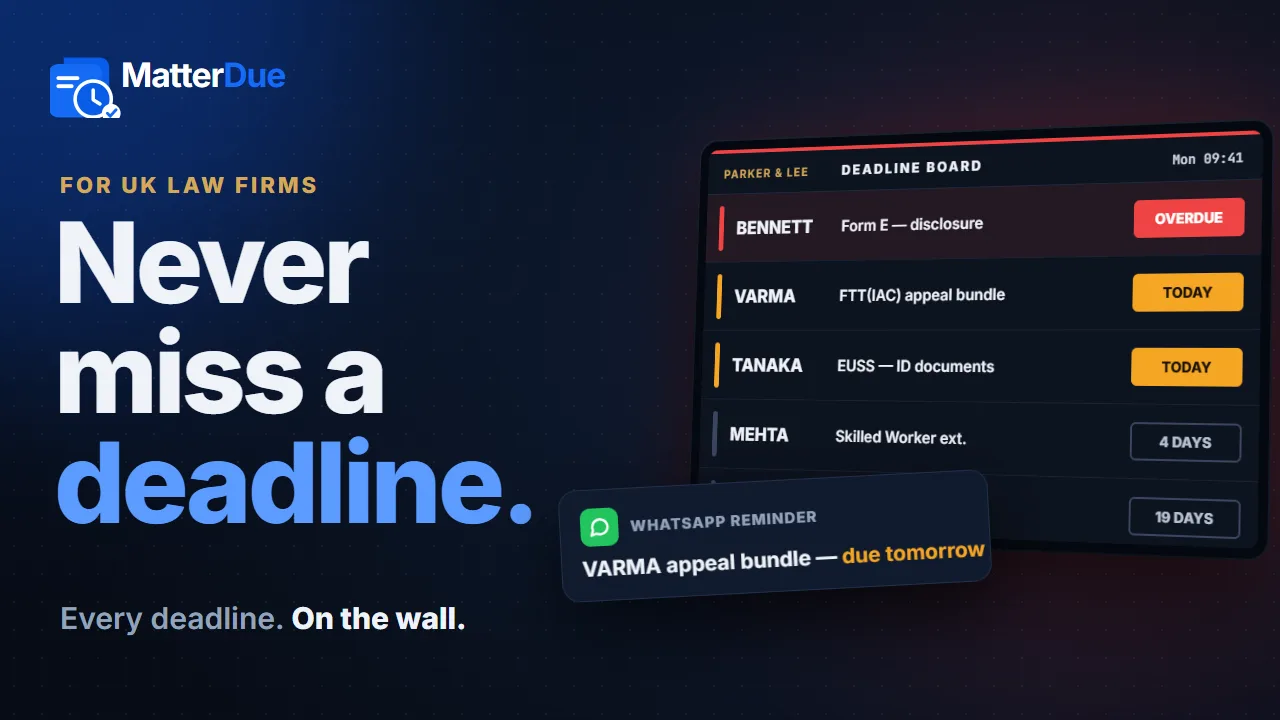
The office deadline board
One screen. Everyone sees what matters today.
Put Matter Due on any office TV and the whole team sees what's due, who owns it and what's overdue — paging through each caseworker in turn.
On the office TV
As many screens as you need. Reception's can hide client names.
On the caseworker's phone
Their own deadlines and reminders — in the browser, no app.
In the manager's inbox
When a deadline is still open after it was due.
Check your deadlines from your phone.
Matter Due works in your phone's browser exactly as it does on a desktop — the same dashboard, the same data, the same login. See what's overdue, reassign a deadline or mark one complete between meetings or at court, without being at your desk.
- No app to install — sign in from any phone's browser.
- Same login, same data — not a cut-down mobile version.
- See what needs attention wherever you are.
Built for everyone who touches a deadline.
One system, three different jobs — each person sees what they need.
Know exactly which deadlines are yours.
- A Mine view of your own deadlines
- Reminders before each one is due
- Mark work complete from your phone
See what's overdue and at risk across the firm.
- Counts at a glance, filtered by caseworker
- Told when something's still open
- Reports you can download as a spreadsheet
Put this week's deadlines on a shared screen.
- Any TV or monitor with a browser
- Full, Standard or Private detail per screen
- Private mode never shows client names
From deadline recorded to deadline controlled.
-
1
Record
Add the deadline and assign the person who owns it.
-
2
Prepare
It shows on the office board and their dashboard well before the date.
-
3
Remind
The owner is reminded as it approaches, on your firm's schedule.
-
4
Act
Done — it's marked complete. Still open once overdue? A manager is told.
You can add your first matters in minutes. If you have a long list to bring over, we'll help you enter it.
An example
Follow one deadline from start to finish.
Here's what Matter Due does with a single deadline — and the record it leaves behind, so when someone asks how it was handled, the answer is already there.
- Up to 10 reminders per deadline — 14, 7 and 1 day before by default, or your own timing, from minutes to days.
- Each reminder goes out on every channel your firm switches on: email on every plan, with SMS and WhatsApp on Gold and Premium.
- Still open once it's overdue? A manager is told.
- Reminders go to your own team — never to your clients.
- 30 Sep Added and assigned to J. ReyesOn the board and the owner’s dashboard
- 30 Sep 14 days before · Email + SMSSent to J. Reyes by email and text Sent
- 7 Oct 7 days before · Email + SMSSent to J. Reyes by email and text Sent
- 13 Oct 1 day before · Email + SMSSent to J. Reyes by email and text Sent
- 14 Oct Due today on the office boardThe whole team can see it Due today
- 2:10pm Marked complete by J. ReyesWho completed it, and when, on record Done
Had it still been open once overdue, H. Grant (manager) would have been told.
In use at a real UK law firm.
Not a mock-up. Here's what a firm using Matter Due every day says about it.
“Since using Matter Due, we have a much clearer view of our upcoming deadlines and who is responsible for them. The deadline board makes it easy to see what needs attention, while the reminders give the team an extra layer of control. It has made managing deadlines much more organised for us.”
 Aziz Sinclair Solicitors
London · View on Google ↗
Help shape Matter Due with a real legal workflow.
Matter Due is working with a small number of firms and refining the product around how they actually handle deadlines.
- Direct access to the person who builds it
- A real say in what gets built next
Built with law-firm data in mind.
Your firm's data stays separate, in the UK, and under your control.
One price for the whole firm.
Not per caseworker. Try it free for 14 days first — no card required.
Questions firms ask before trying it
Our case-management system already has deadlines and reminders. Why add Matter Due?
Keep it. Clio, LEAP and similar systems are the record of the matter, and many of them can send reminders too. Matter Due focuses on the firm-wide side of deadlines. Reminders go out automatically on a schedule your firm sets once — up to 10 for each deadline — and reach caseworkers on every channel you switch on: email, SMS and WhatsApp (SMS and WhatsApp on Gold and Premium). On top of that: one view of every deadline and who owns it, a manager told if a deadline is still open once it's overdue, and an office screen that shows the whole team what's coming up. The two run side by side — there's nothing to integrate.
Who receives the reminders? Are our clients ever contacted?
Only your own staff. Each deadline reminds the caseworker who owns it, and a manager if it's still open once it's overdue. Your clients are never contacted by Matter Due.
Can an office screen hide client names?
Yes. Each screen has its own display mode — Full, Standard or Private — so a screen in reception can show far less than one in the caseworkers' room. A screen in Private mode never receives client names at all.
Who at Matter Due can see our data?
Nobody, as a matter of routine. Our staff can only reach a firm's account with two-factor login, and every access is recorded with who did it and when. See our security approach for more.
How does the 14-day free trial work?
Sign up and use Matter Due with your real deadlines for 14 days — no card required. Matters, the dashboard and email reminders all work from day one. If it works for your firm, subscribe from your billing page; if not, do nothing and you won't be charged. See pricing for what happens after.
We track deadlines in a spreadsheet today. What does moving over involve?
You add your matters and deadlines in Matter Due, each assigned to a caseworker from the start. If you have a long backlog, we'll book a short session and enter it with you. Nothing has to stop while you do it — you can keep the old spreadsheet running alongside until you're confident in the new system.
What happens to our data if we leave?
It's yours. You can export your matters, deadlines and reminder history to a spreadsheet at any time. If you close your account, your firm's data is permanently deleted — no charge, and no approval needed from us to take your records with you first.